
Capturing leads is a vital part of what a website does.
As the traffic to any site grows, you want to get as many people as possible to opt-in to your email list.
This is why, annoying as they are, pop ups are so prevalent on many sites.
They work, like it or not.
The trouble is these pop ups work in the same way.
A visitor comes to your website, sees a form and opts-in.
Later, when they re-visit your site, they see the same pop up.
Which is a waste.
Capturing Leads
Lead capture is a technique used by businesses to encourage potential customers to subscribe or give their contact information.
This can be done in a variety of ways, but the most popular methods are through forms and landing pages.
Forms allow visitors to provide their name, email address, and other details that you might want for your marketing efforts.
Landing pages serve as an introductory page where visitors can enter their email address in exchange for more information about your company or product offerings.
Convert Box is a tool that helps you generate new leads quickly by adding elements to your web pages.
This post serves as a ConvertBox review.
Drag and Drop
ConvertBox helps you to get more leads and sales by engaging certain people at the correct moment.
It allows you to create and launch any style of on-site message in a few clicks like these:

It also delivers a more personalized experience with smart high-converting on-site messages.
These are simple optin forms that can cover the full page of your website, or small areas; such as a sticky bar at the top.
You can employ these site wide or on certain sections of your site to get more opt ins.
Fully customisable Convertboxes
Here are some examples of the styles you get.
The intuitive editor means you can fully customize all aspects of the boxes.

Apart from the samples above, you can also create others like sticky bars that will remain always visible on top of your website posts or pages.
Or, maybe you’d prefer something that covers the whole site like this?

Or maybe the traditional style pop ups like these:
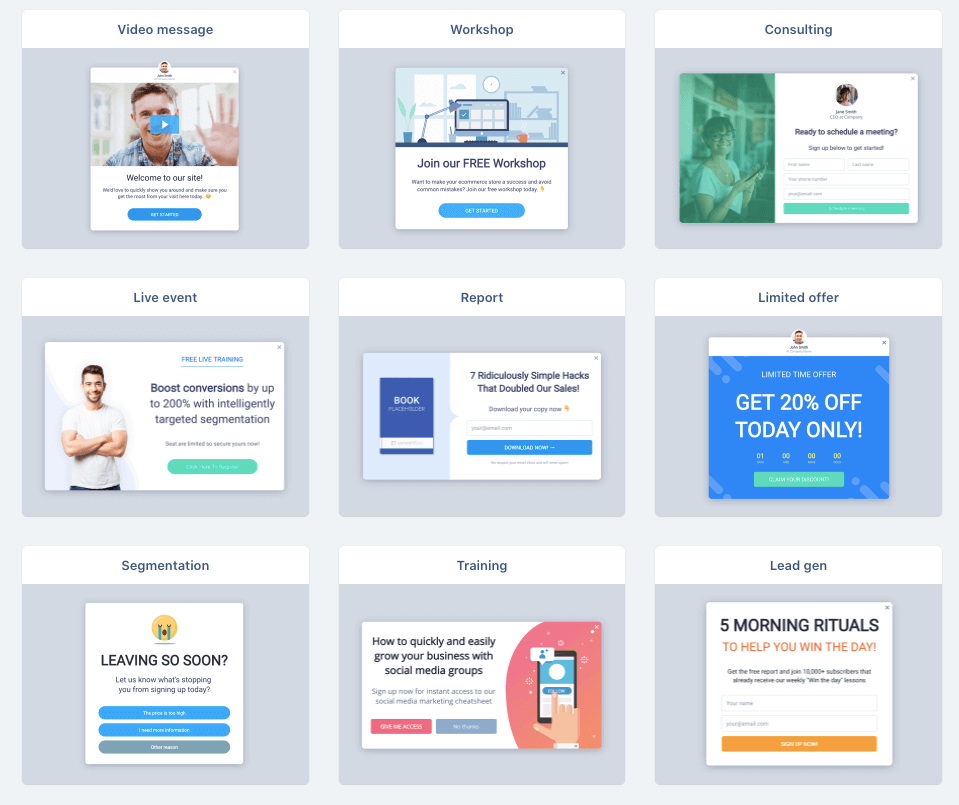
The Different Types of Convert Boxes
A ConvertBox, also known as a modal box, is the perfect way to test different options and find out if your popup window will be most effective for its intended purpose.
Callout Modal
The callout modal slides into view in the bottom corner with an unobtrusive offering, but offers a slender popup for those who want more information about what you’re advertising.
On mobile sites they are nearly indistinguishable from other types of popups; however, their shape and style make them stand out still just enough to be noticeable!
Full Page
When it comes to popups and other forms of advertising, the goal is often engagement.
The best way to get visitors’ attention?
Cover up everything on their screen!
This seems counter-intuitive because you’re actually doing more work for your visitor by covering all those lovely distractions they were just enjoying before they clicked on your ad.
But when it works – really well in fact – that’s enough motivation alone not only keep trying but put this technique into a test group as soon as possible and see what happens next.
The full page modal can be highly effective, however I only use them when split testing since most people close these quickly while viewing my site with potential distractions covered entirely so if there are better options then go ahead try something different.
Sticky Bar
If you’re looking for a popup without all the bells and whistles, then try sticky bars.
They are slim rectangles that appear at the top of your browser window when activated by clicking on them with either button 1 or 2.
I don’t use these very often but when I do they usually serve as congruent calls to action.
Center Modal
In my testing, the center modal is typically one of the most successful strategies: it pops up right in the middle of your screen yet only takes as much space as you need to get across a message and offer.
This strategy has been very fruitful for me except when I’m presenting an irresistible single-button offer with concise content; then callouts seem to be more effective.
More Advanced
Now, if you want to go more advanced you can use the segmentation feature.
This allows you to ask website visitors questions such as:
Are you more interested in organic or paid video traffic?
Then, based on their answer, send them somewhere congruent.
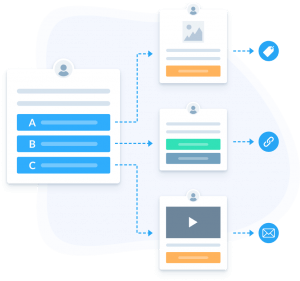
You are able to create as many steps as you want and use it like a quiz builder.
ConvertBox Review
As soon as you login, you are met with a clean UI/UX interface.

You see a snapshot of the past 30 days and if you click on the box in question you can see more detailed stats should you wish.
Rather than create a whole super long written review, I will take you inside my account and show you first hand how it works.
A Walkthrough Video
As you saw, the editor is simple drag and drop.
You can insert text, videos, images, buttons, videos, forms, pure html and much more to get better conversions.
Now, for affiliate promos or selling your own offers, try adding a countdown timer.
The timer an be set to end whenever you want.
Even better though is the function to create popups that will no longer show up after a specific date.
Display and Targeting
It has a variety of triggers to determine who sees your popups
- After some time
- after a percentage of scrolling in the page
- after a period of inactivity
- on click of a specific element in your page
- on page abandonment
But perhaps the best feature is the conditional rules.
You can decide to show this pop-up to everyone or to specific visitors as is shown in the image below.
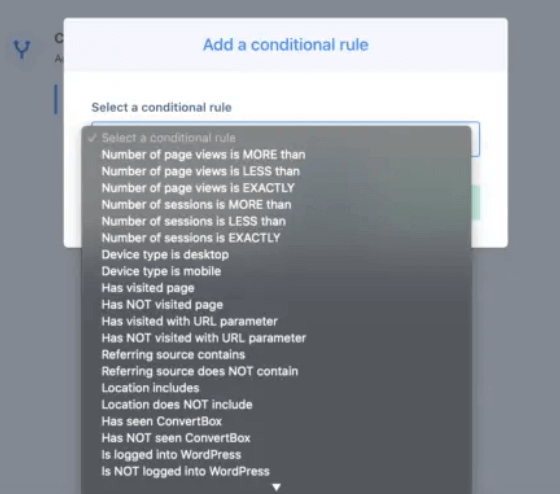
Super powerful!
You can also use the split testing feature to compare the forms you create.
More on that later.
You can add an image or two to your forms to make them look nicer
Now let’s move onto the integrations.
ConvertBox Integrations
At the time of writing, Convertbox has these integrations:
- ActiveCampaign
- AWeber
- ConvertKit
- Demio (webinar platform)
- Drip
- GetResponse
- Gist
- Hubspot
- Infusionsoft
- Klaviyo
- Mail Chimp
- MailerLite
- MooSend
- OntraPort
- Platformly
- Sendinblue
- SendFox
If you do not have any of the above then not all is lost.
3 other options are:
- HTML integration
Using Convertbox’s HTML form integration, you can collect data. - Webhooks
Add your webhook URL which submits data either to your app or your custom made integration.
- Zapier
Connect to Zapier using the Convertbox webhooks.
From here, the data is sent from Zapier to tons of other applications or platforms.
WordPress Integration?
You have two choices.
The plugin they provide or adding a Javascript code to your website header.
If you run a WordPress site, then you can use the Convert Box WordPress plugin to simplify building an email list.
It’s super simple to implement and get started and one of the best tools I use.
Can I use ConvertBox on my shopping cart?
Most checkout platforms allow for the adding of tracking scripts so you are all set on that score.
ConvertBox allows you to create and launch any style of on-site message in a few clicks like these:
Split Testing?
A/B testing is a way to test and measure which marketing campaign, website or platform most effectively converts.
A split can be set up in order to determine the conversion rate for each variation of what you are promoting.
This method identifies how user-friendly your site really is and also determines if it’s popular among its users as well!
One of my first thoughts on convert box was that if it could do this, then I could compare which boxes convert the best and then run better affiliate marketing campaigns.
I also play around and tested the best call to action as well by crafting multiple variations of lead magnet to see which appealed most.
It really is a powerful feature for any online business.
Tracking your Results With Convertbox
The ConvertBox platform is an effective opt-in tool for marketers because it gives you real time analytics and insights of every element in your messages.
This allows you to tweak each step until finding one that has the maximum return on investment.
Amazing Targeting Options
You can get as laser-focused with your messages on ConvertBox.
We know that too many ads and bad design make for a terrible user experience, so we let you decide which visitors see what by looking at factors like:
- their number of visits to the site
- where they came from (in terms of website or search engine)
- device type they are using
- how far down the page they have scrolled in order to present content tailored specifically for them!
No matter who comes into contact with one of our conversions pages, it’s always clear who should be seeing each message because each is custom designed just for those precise people.
Exit Intent Technology
In order to retain visitors before they are gone completely, many online shops and websites will use an exit intent popup.
These popups work by tracking the cursor movements of website users who are about to leave or have left their site; when a user’s mouse moves outside the page boundary where your tab bar is typically located, this prompts you with an offer that may be too good for them not to take up on it.
ConvertBox Exit Intent Technology?
ConvertBox now has an Exit Intent trigger which works on both desktop and mobile.
On desktop, the trigger is based on the mouse leaving the top of the browser window.
Since there are no mice to detect “intent” from a visitor’s perspective with respect to using their phone or tablet in place of a computer keyboard and monitor, they use special scrolling behavior instead:
On mobile devices, when visitors scroll slowly down pages (reading) before quickly swiping downward for opening up navigation menus typically found at bottom-of-screen within most browsers that come installed by default.
This will only fire an intent if it meets both criteria simultaneously – slow reading followed by sudden quick swipe downwards.
If you are using ConvertBox to do email marketing, this is great for lead capture or lead generation.
Engaging On-Site Messages for All Types of Offers
ConvertBox can help you market your business to maximize conversions.
The sky is the limit as far as what type of offers Convertbox will work for, like targeting visitors that are abandoning a shopping cart with new offer or increasing sales by offering discount coupons and limited time specials to drive them into last minute buying rushes.
You get creative when utilizing all variations of techniques available through ConvertBox so they stay engaged in purchasing from you!
How can You use convert Box in Your Business?
With so many different ways to use opt-in forms, the possibilities are endless.
Say Hi
With ConvertBox, every visitor becomes a potential customer.
The robust targeting functionality makes it easy to customize messages and greetings specific for the interests of your target visitors – streamlining their journey from stranger to brand advocate in mere seconds!
The first impression is everything when you are welcoming new customers with personalized content that speaks directly to them right off the bat.
With their smart features like customizable message greetings and personalization snippets throughout your site or blog posts, you can make sure people are always informed about what’s happening at any given time on your website.
Dynamic Quizzes
ConvertBox is a powerful tool for marketers because it allows them to create dynamic multiple-choice quizzes that can be used to redirect visitors depending on their answers.
With specific tags, you can even use the information from these quizzes in your autoresponder and target different sections of your email list based on quiz results!
It’s also great for guiding users through your website – if they are beginners, experts or somewhere in between with knowledge about what you’re selling then ConvertBox lets them select their level before going any further.
Countdown Promos
Countdown timers are a fantastic tool for conversions.
When you’re running limited time sales, the countdown feature will show that there’s only so long to take advantage of these prices before they run out!
Just set up ConvertBox and watch your conversion rates soar as people rush in at the last minute to get their hands on this special offer while it lasts.
Location Location
Do you want to reach out to a specific group of people?
With the new sticky bar feature, now you can!
You’ll be able to make site-wide announcements that target only those visiting from your desired location.
For example: if you’re planning on setting up an event in Las Vegas and would like it restricted solely for visitors there, this is just what the doctor ordered.
Click Triggers
The Text links and image link triggers within ConvertBox are some of the most successful conversion tools in marketing.
These new updates introduce an opt-in form where people can subscribe to get updates or downloadable content such as:
- training courses
- podcast notes
- guides
- limited time access to your services at the same time that you have full control over who sees what messages leading up to higher opt-in rates from specific audiences.
ConvertBox Review – Some Tips
Here are some things you can do to get better results with ConvertBox.
Tag like a made person
You’ll be able to take your website’s content and organize it by tags, which is something that will make ConvertBox more effective.
It becomes a lot easier for you to send special offers (to the right people) when you can set rules about what kind of content are offered based on these different categories or groups.
The result?
Much higher conversion rates across the board!
Make use of Images
You need to be able to grab attention on your website or blog.
Your click-triggered links and opt-in forms should all be compelling, but it’s hard without images!
A small image alongside the text is enough for people not only notice them more quickly, they’re also a good way of getting around that “text blindness.”
ConvertBox Vs Thrive Leads
Thrive Leads is an email list building plugin for WordPress websites.
It has several integrated features that allow you to grow your list quickly and send regular email (but it doesn’t send emails).
It has opt in forms that can be targeted by the user’s location or interests through Facebook Pixel events.
And it has anding pages which seamlessly integrate into Thrives Lead Scarcity Builder so users get triggered based on their behavior patterns.
They too have A/B Testing which allows marketers test two versions of any type of content – from headline copy, images, video scripts etc., then measure how each one performs against key metrics such as conversion rates and lifetime customer value.
Now, while Thrive is good, it has a much longer learning curve and all the extras add strain to your website and slow it down.
Plus recently they had a big security breach.
For getting up and running quickly and for a cheaper overall price, Convert Box is the winner for me.
How much is Convert Box?
The ConvertBox team is so confident in the quality of their product that they are offering a limited time offer where you can get all the benefits without paying ongoing fees.
The lifetime package will only be available for purchase for a short while, after which it’ll switch to monthly payments like other competing products.
But there’s no need to worry about any technical details or comparisons—we’re sure this one offers more than enough value!
ConvertBox – Summary
This is one slick tool and very easy to use.
The features of it really allow for you to turn any website you own into a lead generation machine.
But in a smarter way than your competitors.
The learning curve is very quick and this is not hard to use at all.
For now, the Convertbox lifetime deal is still available so clear cookies and get that before they remove it.
It is a bit of an upfront investment , but it is a no brainer really.
While future customers are paying monthly or annual fees , you won’t.
Thanks for reading this full Convert Box review.

ConvertBox Bonuses
If you clear cookies and get it via the link on this page then I will give you one of these options.
The full Funnel for The Conversion Point
The full Funnel for Tube Ads kickStart
Simply email your receipt to me so I can verify and let me know your choice.
https://beerswithadam.com/contact
What are the OTOs if any?
There are no OTOs.