
Welcome Pops and Exit Pops: It’s easy to forget about welcome popups, but they can be very effective.
To find out how they work and how you can use them to build your email list, read on.
What is a Welcome Popup?
A welcome popup is an overlay that appears the first time someone visits your website.
It has information or a call to action that makes them want to subscribe.
Here’s an example that sometimes appears on this site.
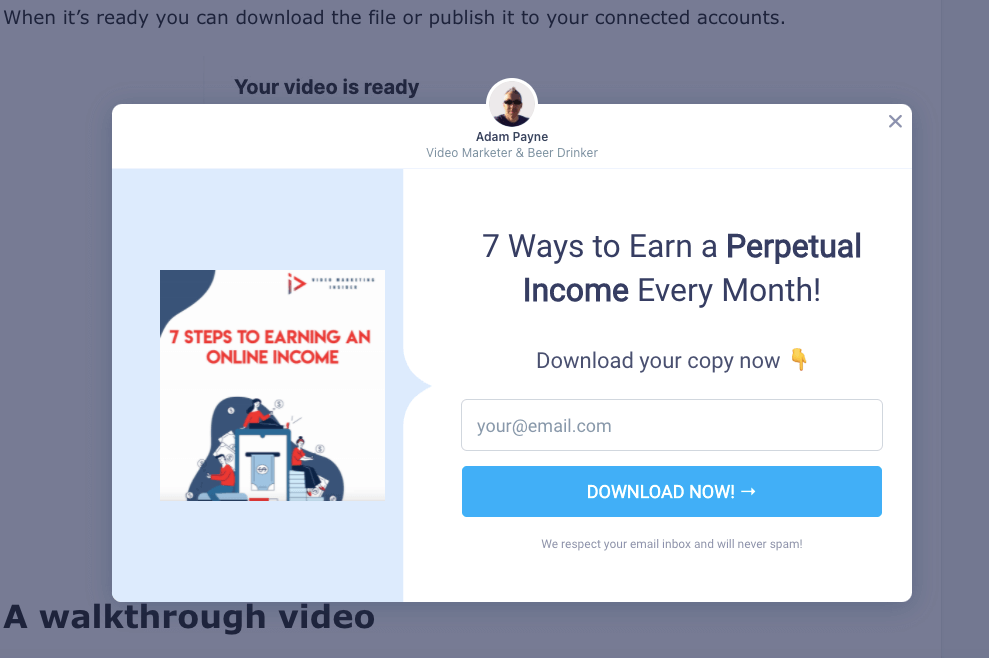
Welcome popups can also be called “on boarding” popups, but the terms mean the same thing, so they’re both correct.
If they seem familiar, it’s because you’ve already seen one when you signed up for your email account.
You can put up a “welcome popup” on your website when someone visits a post or page for the first time.
What Are Exit Pops?
An exit popup is an overlay that shows up when someone tries to leave your website.
It has information or a call to action that makes them want to subscribe, or get a discount on something before they leave.
Like this example:

Many people put an email sign-up form on their website, but then don’t do anything else to encourage people to do so.
If you want people who visit your site but don’t sign up to come back and sign up later, an exit popup can help you get more subscribers.
Different Types of Pop-ups: Welcome and Exit
Because welcome popups show up when someone first comes to your website, exit pop ups appear as soon as someone leaves the site.
But there’s a big difference that goes beyond that:
Welcome popups can show any message or call to action that you want.
Exit popups should only show messages that encourage people to subscribe.

This means that exit popups should only have one thing to do: encourage subscribers
Welcome popups can have a lot of different things that people can do, like subscribe and share the popup on social media or even make a purchase.
If I want to show a welcome or exit message, how can I do this?
There are a lot of WordPress plugins that you can download that will make the opt-in forms for you.
My personal favourite is ConvertBox:
If you don’t want to use WordPress, there are a lot of other options, such as:
● Unbounce
It’s possible to try each of these services for free for a few days.
Using HTML and CSS, you can also make your welcome popup look good.
This will require some coding skills though.

Welcome Popups and Exit Popups should be shown in the places where people visit or leave the site.
Putting welcome or exit popups on your website is easy.
You can put them in many places on your website to make them more visible.
Here are a few:
- The top of the page
- Above the fold
- A certain amount of time has passed.
People who try to leave your website will get a message that says “You can’t leave.”
Keep these things in mind when you write your welcome or exit pop-up
When you write your welcome popup or exit popup, it’s important to keep a few things in mind:
First, make sure that your message is targeted: If someone has already subscribed to your email list, you can thank them for subscribing and sharing how they benefit from the subscription.
If someone hasn’t subscribed yet, it’s important to state what visitors will get by subscribing clearly.

This helps avoid confusion or misunderstandings.
Second, make sure that your call to action is clear; Your call to action should tell visitors what they need to do to subscribe.
For example, “enter your email address” or “click the button below.”
Third, make sure that your popup is visually appealing; Your popup should be designed in a way that encourages people to subscribe.
This means using attractive colors and fonts, as well as images.

Fourth, you want to make sure that your popup is mobile-friendly; Your popup should be easy to read and navigate on mobile devices.
Fifth, you want to make sure that your popup is responsive; A responsive popup contains all of the same information and does the same thing, no matter what device it is displayed on.
What to write on a Welcome Popup or an Exit Popup?
If you use your welcome popup or exit popup to ask for a sale right away, you might not want to.
After all, if you can get someone’s attention, you might as well try to get them to buy something.
Make sure you include a call to action, but don’t ask for a sale just yet.

People should have time to learn about you and your product first.
People should instead think about why they should subscribe and what they will get by doing so.
In this case, you might want to:
It’s a good thing that new visitors have signed up for your newsletter.
Subscribers will get tips and tricks, special articles, and discounts on products if they sign up for the service.
If you have a Welcome or Exit pop-up on your site, how long should you keep them there?
This will depend on what your goals are.
As long as you want someone to sign up right away, it might be fine to only show the popup for a short time.
But if you want people to come back later and subscribe, you should make sure that your popup stays up for a good amount of time.
How Long Should You Keep a Welcome Popup or Exit Popup On Your Site?
This will also depend on your goals.
If you want to show people the popup again and again, you should make sure it shows up every time they visit your site.

It’s different if you only want to show them once or show different pop-ups, so you should make different pop-ups that each show a certain number of times.
How Can You A/B Test My Welcome Popup or Exit Popup?
Tests are called A/B tests when you compare two different versions of something against each other.
As an example, you could see how the “start” button and the price of an item compare.
To run A/B tests on your welcome popup or exit popup, you need to have at least two versions of each one of them.
These are called “A” and “B” tests, where “A” is the original version that you want to compare against. “B” is the version that you want to compare against.
To start, run one test for a while, then run another test after that.
This will let you see which one is more effective at getting people to sign up for your email list.
How do you Make Welcome Popups or exit Popups Mobile Friendly?
To make your popup mobile-friendly, you need to make it easy to read and navigate on mobile devices.
This means using large fonts and avoiding tiny buttons that are difficult to press.

Where Should You Put Them?
This will also depend on your goals.
Putting the popup at the top of your site will make it easier for people to find.
People who have been on your site a long time should put the popup at the bottom.
When you think about where to put your popup, remember that there isn’t a right or wrong answer.
Try a few places until you find the place that’s best for you.
Final Words
Welcome and exit pops are very useful when it comes to list building.
Putting them on the right pages at the right times is key though.
Overkill can lead to a bad viewing experience and a poor bounce rate.
Get it right, and it’s a win win for all.