
I‘m going to show you step-by-step over the shoulder how to correctly set up your first YouTube ad campaign.
And we’re going to be focusing on in-stream ads, which are the small commercial-style videos that appear prior to the video that you had wanted to watch.
Now, these can be annoying to a lot of people because for the most part, they’re not targeted but done right they’re very, very powerful.
So without further ado, let’s hop on over to our Google Ads account and let’s set up our first YouTube ad campaign.
Set up Your First YouTube Ad Campaign
It’s going to look for you if you’re doing this for the first time.
So once you’re inside of your Google Ads account and you’re on the overview section, you’re going to want to click this button here which asks you to create a new campaign.

And from here, you’re going to be presented with various choices.
And each choice is a goal that you would like to choose to make this campaign successful to you.
Choosing a Goal
Now, as a brand new advertiser, you may be tempted to choose something like sales or leads, because that may be what you’re trying to get.
But unfortunately, this isn’t going to be the best option for your first YouTube ad campaign.
Your pixel or Google snippet is not really going to have any data to go off of.
So in that case, I always recommend you choose one of two things.
Now you can create a campaign without a goal’s guidance, which is what we’re going to do here.
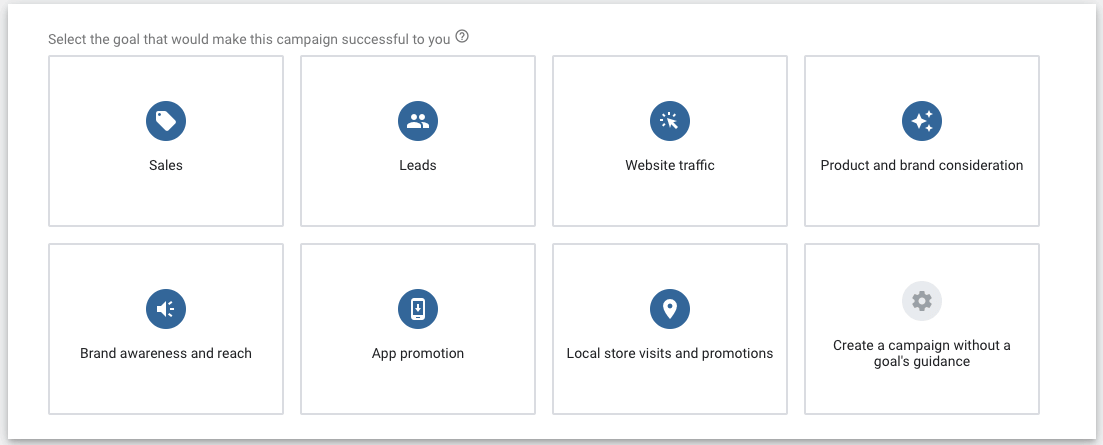
And this is going to give you more options, but it’s also going to allow you to have more control over what you do.
Or you can go with website traffic if you want to.
Now, there are some people that would advocate brand awareness and reach as well. Because if you’re new, your brand isn’t going to be known by a bunch of people.
So, that is also an option as well.
Choose ‘create a campaign without a goal’s guidance’.
From here, choose videos and then we’re going to create custom video campaign.
Click on continue.
Now let’s get cracking and set up your first YouTube Ad campaign.
The Campaign Level
From here, you are going to want to give your campaign a name.
Now, of course, when you actually get to this stage, you will have decided whether you’re going to run a discovery ad or an in-stream ad.
And hopefully you’ll know a little bit about that kind of targeting that you’re going to run.
If you don’t know this information, then it’s really important that you decide this through your own research before you go and create a campaign.
Sample campaign name:
CTA | Targeting | Bid | GEO
Opt-in | Placements | CPV | US+UK
This is purely for your own benefit so that when you come in later on if you have two or three campaigns running, you’ll know what’s what.
Now the bid strategy by default will be maximum CPV.
CPV stands for cost per view.
Now a view is when somebody watches 30 seconds or more of your video, if it’s an in-stream ad or the entire video it depends whatever comes first.

If you’ve got a five-second video, which you wouldn’t have, but if you did, then you’d get charged every time somebody watched five seconds.
You also of course get charged if somebody clicks.
But if somebody watches your video for say 15 seconds, and your video is two minutes long and they decide, “No, it’s not for me” and they skip the ad, then you don’t pay a penny.
Now you can click on learn more and you do have a couple of other options as well.
CPM is cost per thousand impressions, but we’re going to leave it at cost per view.
Budgeting
Regarding your budget, you can spend hundreds and hundreds of dollars a day.
You can spend $5.
Basically budget what you can afford to lose.
And that’s the mindset you’ve got to have. You can’t expect to hit a home run.
You can’t expect to make money straight away.
You might do.
If you do, that’s fantastic.
But your mindset should be, “What are you prepared to spend to get data back?”
You do have the option to have a start date and an end date.
Next, uncheck this video partners on the Display Network.
These are certain websites that Google/YouTube have a contract with, and you don’t want your video ads being shown on those.
Location
You can have multiple countries, you can have towns, cities, bars or zip codes, whatever you want, and you can get quite granular.
Look at the below image as an example:
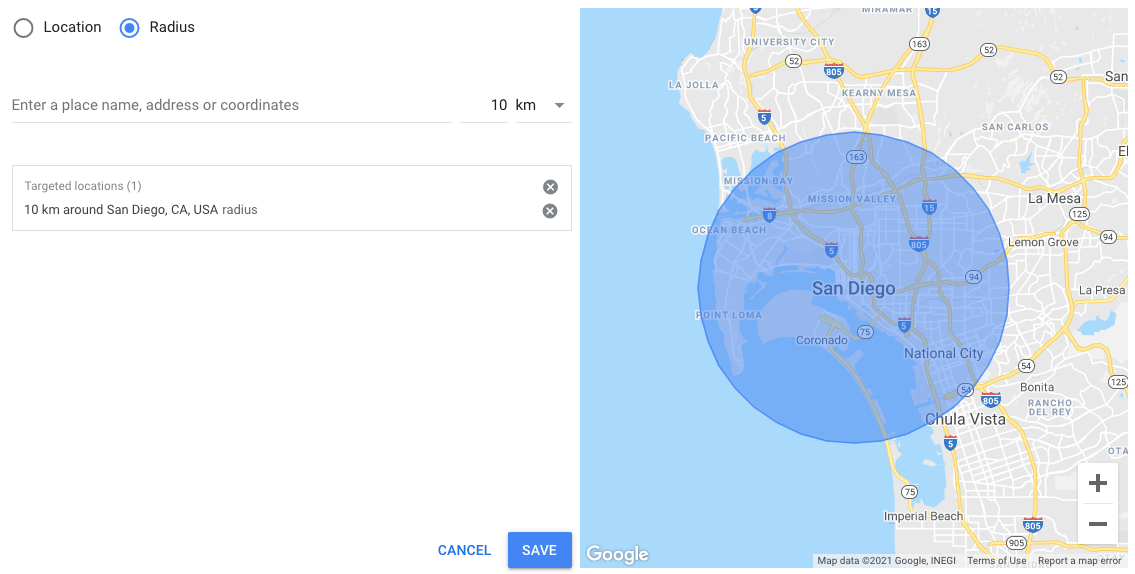
I could target San Diego then I could click on radius and I could go down to kilometers and maybe 10 kilometers, and hit save.
This would be a prefect choice if running ads for a local business.
Language
You do not want to have all languages.
I always choose English.
There are lots of people in the US that speak Spanish.
There are people in other English-speaking countries that also speak a second language.
If you’re targeting Canada and you’ve got an English ad, don’t put all languages because you’re going to get a lot of French speakers watching your videos.
So make sure that you actually put the language in.
Inventory type
I’m going to leave this at standard for now.
Regarding exclusions, I do not want my ads to be shown on live streams or embedded videos on third-party sites.
That’s because I don’t believe that they will convert.
Because if somebody is watching a live stream and then my video appears, that it’s highly unlikely that they’re going to suddenly be interested in what I’ve got to say.
It’s really entirely up to you, but I would always advocate you check those two things.
Additional settings
Conversions won’t matter to a new account because you won’t have anything to go by.
Devices; I recommend unchecking TV and tablets for now.
We also have frequency capping.
This is where we can determine how often we want our ads to be shown to the same user.
I’m sure you’ve experienced where you’ve seen an ad three million times and it can get frustrating.
There are pros and cons.
People obviously do it because it does work and people see an ad so many times they think, “Okay, I’ve seen it a hundred times. I’ll check it out.”
Other people will get really frustrated and make a decision not to interact with your brand.
So you make the call there.
The Ad group
So I’m going to call this keywords.
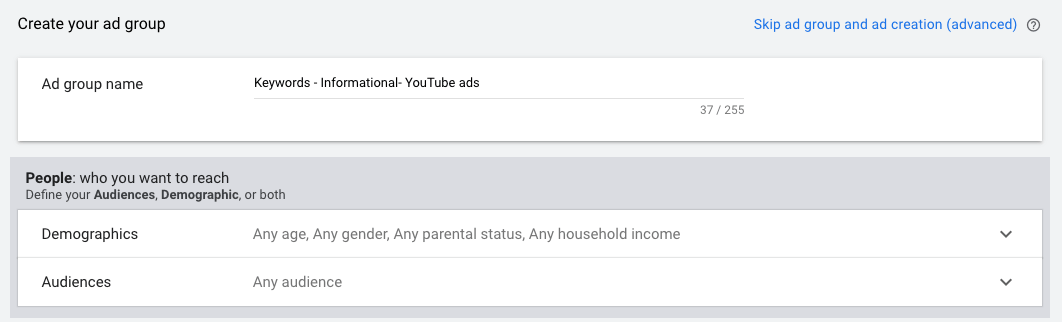
Now keywords means a bunch of things.
If you’re targeting people that want to lose tummy fat, then your keywords are going to be tummy fat keywords.
Are they going to be buyer keywords, product name, review, where to buy a product name?
Are they going to be keywords that are informational? How to, for example.
Or are they going to be comparison keywords A versus B, product A, versus product B?
You need to know that.
So I’m going to call this informational keywords and we’ll choose a random topic.
We will call this YouTube ads.
Targeting
Now we come down here for targeting and we have two sets.
We’ve got people targeting and content targeting.
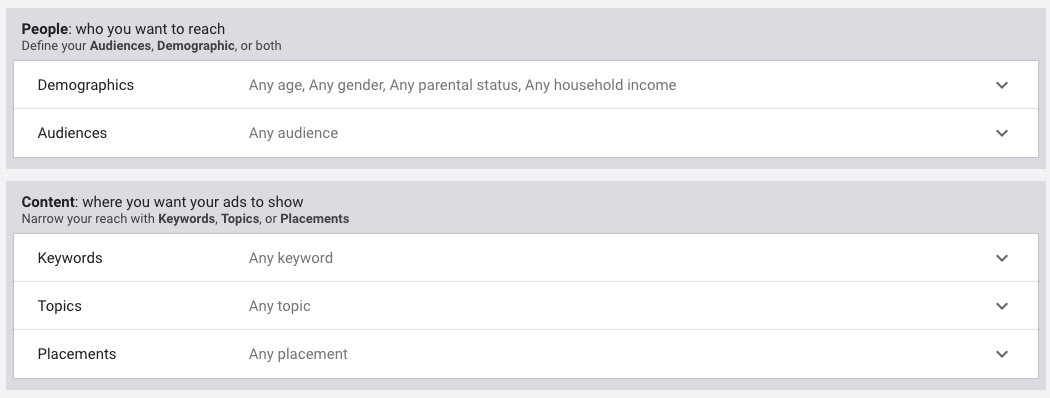
Now people targeting for demographics is fairly self-explanatory.
You should know what kind of demographic you want to target or not.
If gender is irrelevant, leave both male and female checked.
Now unknown, I would leave checked throughout this whole thing.
Unknown is just basically Google doesn’t have any information.
Lots of people go and they surf the net without being logged on and all that stuff.
They use incognito, they use a VPN.
So we don’t really know who they are.
Now, when people think, “Well, how many keywords?”
It really does depend on your niche and how much traffic leads, potential keywords get.
If you’re in a niche that doesn’t have a lot of traffic, you’re going to want to add more in, but I would advocate anything from to say three to 10 keywords as a guide, but you could get away with one.
If there’s a ton of people searching for tummy fat diet plan for example, that may be more than enough to target that one specific keyword.
Audiences
If we open up audiences, if we were to click on browse, they’ve got a bunch of things in here, which if you’re new, you’re probably not going to have set up.
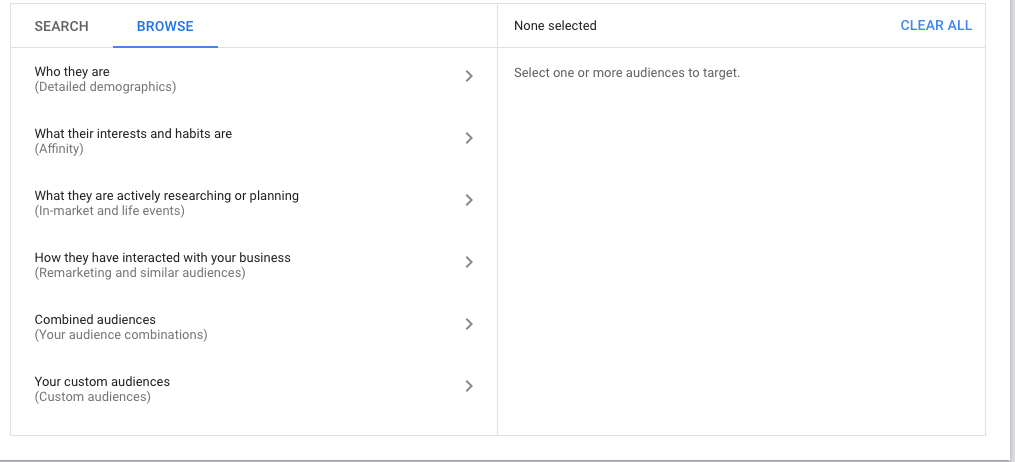
But you can target people based on their affinity, based on what they’re actively researching, life events.
So for example, if I was to click on life events, I can target people for example that are getting married soon or a recently married.
So if I’ve got a photography company that does wedding shoots, maybe getting married soon would be a great thing to target in a specific geographic location.
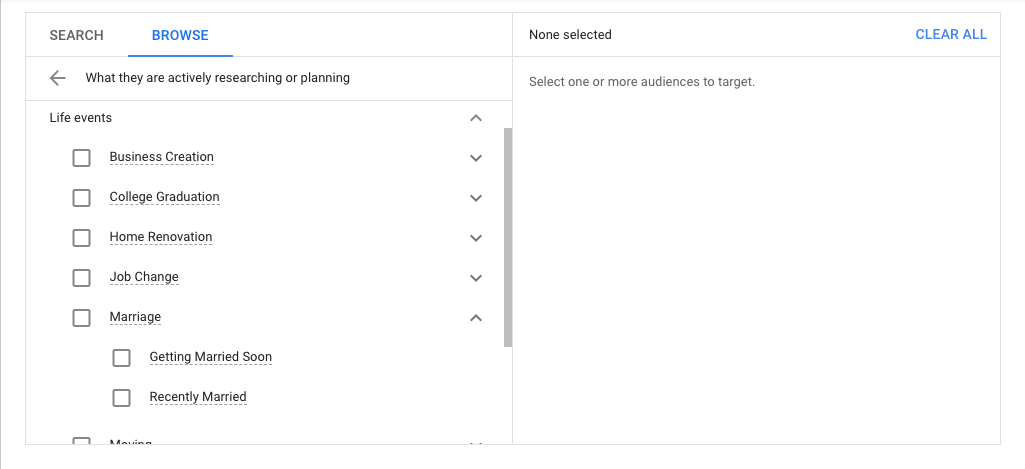
We won’t worry about re-marketing or these things, because I’m going to presume as a brand new advertiser, you won’t have a re-marketing audience, but these are all the things that you either need to consider as you grow.
And if you want to learn this stuff by the way, you need to get YouTube Ads Kickstart.
Placements
Placements are specific YouTube channels or specific videos that we would like our ads to appear in front of.
Bidding
Maximum CPV.
This is what you are prepared to pay for somebody to view your video.
Remember we said a video view is 30 seconds or more of your video or the whole video, whatever comes first.
Now we’re not going to pay this.
This is just what we’re prepared to pay.
It works like an auction.
So if you’ve bid too low and other people that are targeting similar things are bidding higher than you, you’re going to lose out on the auction.
So your ad is less likely to be shown.
So don’t bid too low, but you’ve not got to bid crazy high.
Now there are certain niches like make money online and all of that stuff where you’ve got a lot more competition.
So you’re probably going to have to bid higher on specific niches, but it really is trial and error at first.
The Ad
Now, as we have a skippable in-stream ad, this is what it’s going to look like here.
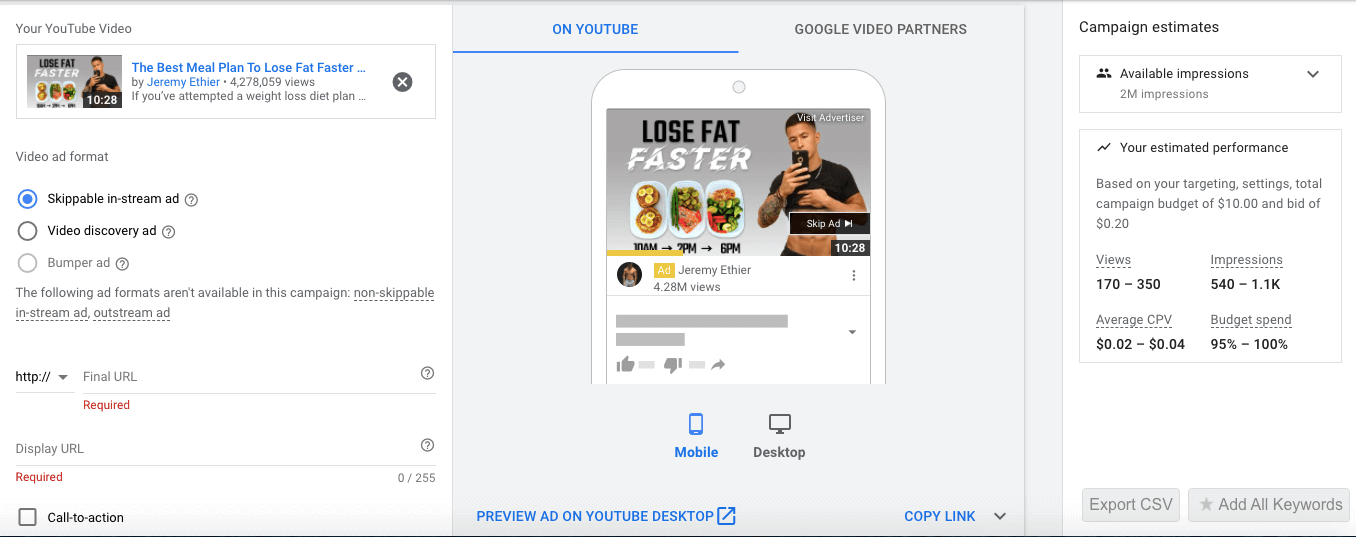
You can add your URL.
This is where you’re going to send people.
So let’s pretend that your’e going to send people to your landingpage.com.
That is where they’re going to end up.
It’s imperative that the display and final URL are part of the same domain.
Make it’s HTTPS as well.
When it comes to a call to action, you can have generic words for example, click, but you might want to add something better.
So for example, the headline could be free recipes [if you are targeting a weight loss audience]
Or whatever you’ve got to give away.
Now, you don’t have many characters to play around with, but you can make sure that you put something specific as opposed to click here, because that is quite generic.
You can preview what it looks like too.
Companion Banner
Now what you can also do is you can add what’s called a companion banner.
This is a graphic, which people can click on to go to your landing page.

And this graphic stays even if people have skipped your ad.
People are typing a keyword lose tummy fat, start watching a video, your ad appears, but they think, “No, I’m not interested,” skip the ad, but your graphic remains.
And if your graphic is enticing, they can click on it.
So you still have a second chance to get people to your content.
Google can auto generate one.
But I would recommend this one, even though Google recommends you do the auto generated one, and you can create a graphic that is 300 by 60 in pixels.
Use Canva.com for this.
Don’t put too much text on the banner, because it’s going to be fairly small, but you may want to play around, have something that stands out, have something that’s congruent to your landing page when it comes to coloring.
And just maybe have a logo and a little bit of the wording. Here’s an example I have used before:

Once we’re happy, we hit create and our first YouTube ad campaign is almost done.
This video is for those of you that prefer to watch things being done.
First YouTube Ad Campaign Video Walkthrough
Your First YouTube Ad Campaign: Wrap Up
If we’ve made any mistakes, we’ll get prompted to go and correct it.
And once we’ve hit create campaign, then it’s just a case of playing the waiting game.
We’ve got to wait a little while for Google/YouTube to approve or disapprove our ad.
And once it’s approved, let it run for two or three days.
Don’t be tempted to jump in and change stuff.
And then come back in and look at the data and optimize.
But that is pretty much it.
I hope you enjoyed this post.
I hope you got value from it now go set up your first YouTube ad campaign.
Please share this post and ask any questions below.
And join YouTube Ads kickstart here to get your first first YouTube Ad campaign running.